Are You Flashing?

To flash or not to flash... If you are looking to get some screenprinting done, knowing the pros and cons of flashing and how it could affect your image is invaluable for both your wallet and your colors.
But first, what do we mean by "flashing" when we talk about screenprinting? The simple answer is that flashing means more ink layers for your print. We print twice on the same material, so usually this means taking the time to align the image with the already printed image and using more ink on whatever material we are printing on.
What does this mean for you if you are trying to decide whether to flash your print or not, though? Let us look at the pros and cons of flashing.
Cons of Flashing:
- More expensive: More ink means a higher cost for both you and your printer!
- Time-consuming: Because the printer has to print twice for everything, this means it takes double the amount of time. This also adds to the cost.
- Heavier: If you are printing on fabric, this means your fabric will feel heavier or more rigid with more ink weighing it down.
- Fine Detail Loss: Because more ink makes the line ever so slightly wider, sometimes we can lose some fine detail lines that, without flashing, may have remained.
Pro of Flashing:
- Brighter colors: The colors stand out and are not faded even if sitting on top of a dark background.
Wait! If there is only a single pro to flashing, why would I ever get my print flashed? Ask yourself, do you have colors other than black in your print? Are you planning to print on dark/er fabrics? Do you want your colors not to look faded?
If you said yes to any of those questions, it sounds like you would likely greatly benefit from flashing your print. When we print on darker fabrics (often even just non-white or cream fabric colors), the colors will often look more washed out because a single layer of ink struggles to compete with the fabric color. Think of layering a semi-transparent piece of paper over a black background, and you will see that it makes your otherwise white paper appear grayer.
What if I want a slightly more vintage look? What if I have lots of fine detail lines in my artwork? If these are things you are looking for in your print, then it would likely be better to skip flashing your print.
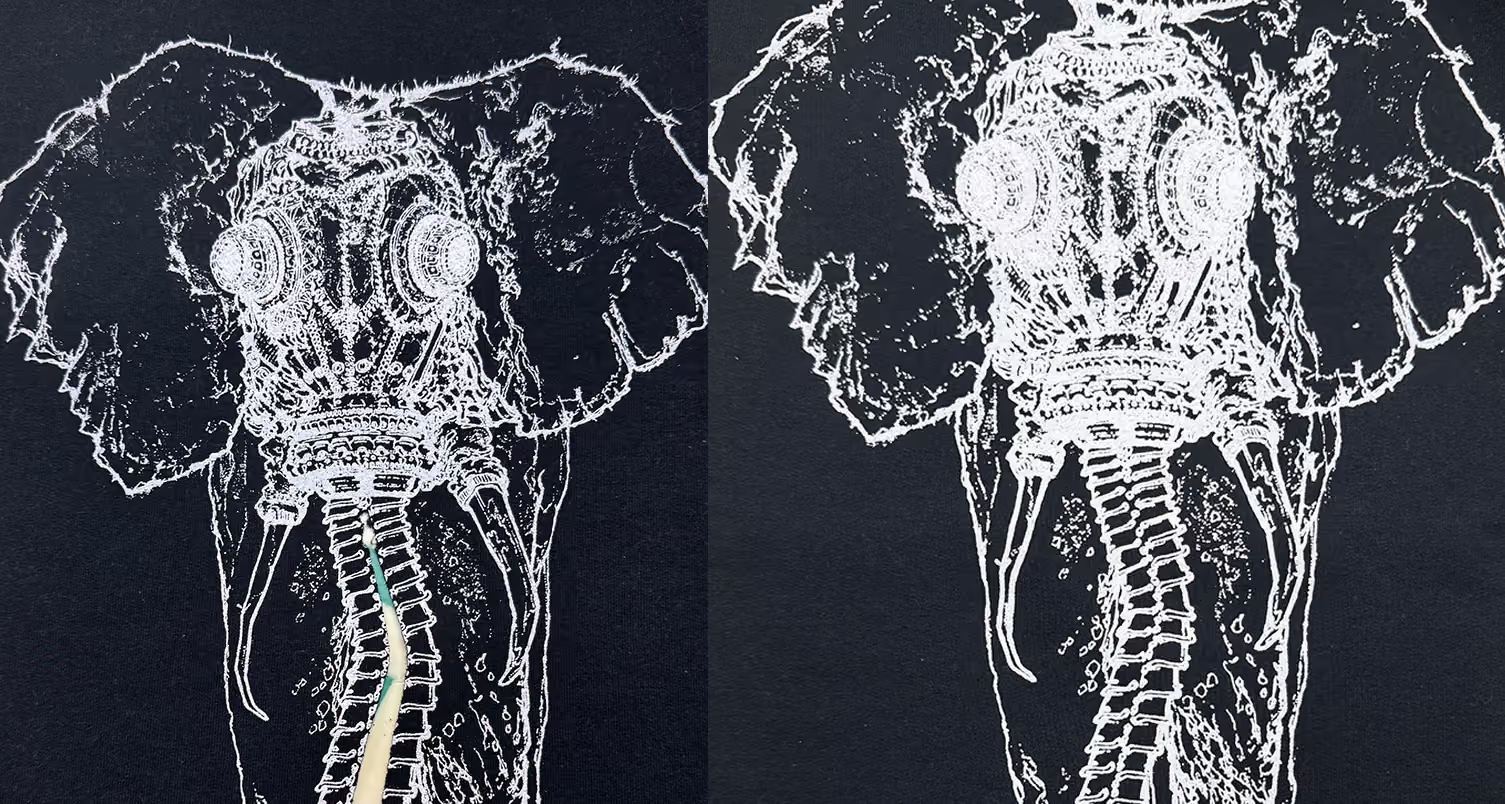
In the above example, we can see the difference in how fine line details are impacted by flashing, and if you look closely, you will be able to see that the white of the lines is slightly grayer in the version that has not been flashed.
There is no right or wrong answer when it comes to flashing, but it is important to remember the impacts your choice will have on your print so you don't leave your print shop disappointed. Communicate your intended vision you have for your print, and maybe show off some of the new knowledge that you have from reading!
more blog posts


Are you ready to go renegade?